
 Create a Student Account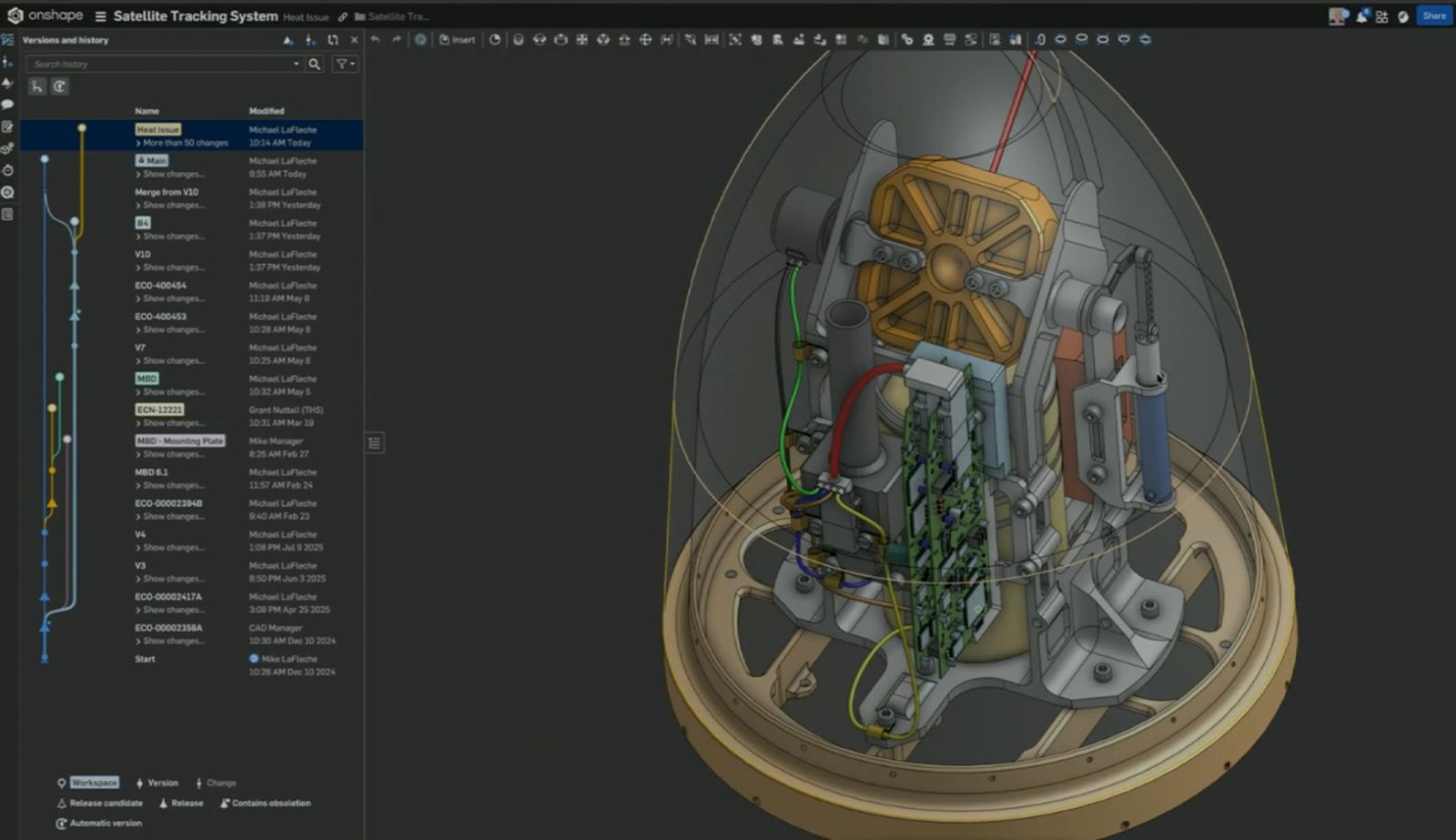
00:00
Summary
- File-based CAD-PDM-PLM workflows push problems downstream where they cost the most to fix.
- The cloud-native Onshape-Arena Connection streamlines design, change management, and quality into one continuous workflow.
- Every feature is built to surface problems earlier during design, review, release, and production phases.
Most hardware teams run three disconnected systems: CAD for design, PDM for version control, PLM for change management. The gaps between them – the manual exports, the BOM handoffs, the file uploads – are where problems hide and where time disappears.
Onshape handles CAD and PDM natively as a single database-driven system. Arena handles PLM. Together they operate as one connected workflow, so information flows automatically across the entire development process and problems surface where they’re cheapest to fix.
Here’s what that looks like in practice.
Find Problems During Design
Traditional file-based CAD serializes work. One person checks out a file, edits it, and checks it back in. Parallel exploration isn’t practical, so teams commit to a direction early and find out late if it was wrong.
Branching
Onshape’s database-driven architecture lets engineers spin off a parallel version of the design to explore a fix or alternative without touching the main design. Branches are cheap to create, easy to abandon, and fully version-controlled. When a problem is identified, an engineer branches from the current design, works toward a solution, and merges back only when it's solid. The main design stays locked throughout. Teams can explore multiple directions simultaneously instead of betting on one.
In-Context Design
New parts can be created directly inside the assembly, with surrounding geometry always visible and always current. There are no file references to manage. An engineer designing a heat sink sees exactly where it fits between two circuit boards as they build it, catching interference and clearance problems in the moment, not in a separate validation pass.
FeatureScript Custom Features
Onshape is built on FeatureScript, the same language that powers every built-in CAD operation. Teams can create their own domain-specific features that encode engineering knowledge directly into the geometry – calculations, geometry, and model-based definition dimensions in a single parametric operation. A custom heat sink feature, for example, calculates surface temperatures, generates fin geometry, applies mounting features, and embeds inspection dimensions all at once. Problems that used to surface in thermal analysis or incoming inspection get caught at the moment of design.
Variable-Driven Design
Variables in Onshape are unit-aware, version-controlled, and shareable across part studios and documents. A central variable table can drive an entire product family parametrically, with full traceability on every change. When a value goes out of range, the model tells you immediately – not after downstream validation.
Find Problems Before Parts Are Ordered
Design reviews break down when they depend on exported files. By the time feedback arrives, the design has moved on and the markup is already stale.
Live Model Reviews
Reviews happen on the live model in a browser, on any device, with no CAD seat required. Comments and markups are created in context, assigned as tasks, and tracked to resolution. Because there is no export step, the model under review is always up to date.
Change Request-Driven Reviews
From Arena, a reviewer can initiate a design review directly from a Change Request – clicking through to the live Onshape model without leaving the PLM workflow. Feedback flows back into the change record automatically. It's one continuous process, not two tools running in parallel.
Model-Based Definition
Tolerances, datums, and inspection dimensions are embedded in the 3D geometry as a first-class feature – not derived from a 2D drawing that may or may not match the model. Apply a tolerance scheme in a single operation and the result is a complete, dimensioned inspection dataset, exportable as CSV and accessible directly from the Arena item record. Dimensional problems that used to reach incoming inspection get caught here instead.
Find Problems Before They Become Change Orders
Moving a design from CAD into PLM is typically a manual process – export a BOM, upload it, reconcile part numbers, and attach files. Every manual step is an opportunity for error and a reason for the two systems to drift apart.
BOM Sync to Arena
A single button push sends the current bill of materials from Onshape directly into Arena, with thumbnail images and STEP files generated automatically. Part numbers follow rules set in Arena by category, with the option to pull the next available number from Arena's sequence. Nothing is transcribed. Nothing is uploaded manually. The BOM in Arena reflects the BOM in Onshape because they share the same data.
Bidirectional Change Orders
A Change Order initiated from either Onshape or Arena links both systems automatically. The ECO auto-generates a number. Release notes flow from Onshape into Arena. Approvals route through the right stakeholders with authenticated sign-off, and when the change closes, the part is marked released in Onshape in real time. Clicking into the change from either system takes you directly to the corresponding record in the other.
Full Audit Trail
Every comment, approval, and revision lives in both systems, always in sync. Who approved it, when, and why is never a question. BOM mismatches and missing sign-offs get caught before the change order is submitted, not after it’s reopened.
Close the Loop Before the Next Escape
Corrective Action Tracking
A field issue is captured in Arena as a corrective action, linked to the affected assembly and non-conforming serial numbers. Root cause points to a design fix. That fix is designed in Onshape on a dedicated branch, reviewed, validated through model-based definition, and released through a change order that routes back through Arena for sign-off. The full chain is traceable in one place, in both systems.
Supplier Access via Shareable Links
Suppliers receive a shareable Onshape link with view and export permissions, always pointing to the current released design. No files sent. No version confusion. If they need a STEP file for CAM, they export it themselves directly from the live model.
Cloud Document References
Quality documents – inspection plans, compliance records, process procedures – attach to Arena item records as live references to their source in Google Drive or Microsoft 365, not as copies. When a document is updated, Arena updates the reference. There is never a question of which version is current.
One Connected Process, From First Branch to Final Sign-Off
If your team is evaluating Onshape, Arena, or both, ask yourself what happens when CAD, PDM, and PLM stop operating as separate systems and start operating as one.
Problems don’t get cheaper the longer they go undetected. The workflow that surfaces them earliest – in design, in review, in release – is the one that wins on cost, on time, and on quality.
The Onshape-Arena Connection is built to be that workflow.
The Onshape-Arena Connection
Experience the benefits of cloud-native CAD, PDM, and PLM today.
Latest Content
- Case Study
- Consumer Products
How Horage is Engineering High-Precision Mechanical Watches Faster with Cloud-Native Onshape
04.24.2026 learn more- Blog
- Evaluating Onshape
- Arena PLM Connection
The Cloud-Native CAD-PDM-PLM Workflow That Finds Problems Before They Cost You
06.11.2026 learn more- Blog
- News from Onshape @ PTC
- Artificial Intelligence
- Robotics
How Multi-Agent Orchestration Between Onshape and NVIDIA Improves CAD-to-Simulation Workflows
06.01.2026 learn more- Blog
- Evaluating Onshape
- Robotics
- Aviation, Aerospace & Defense
- Collaboration
- Integrations
- Arena PLM Connection
- Data Management
Why the Best Hardware Teams Have Started Talking Like Software Engineers
05.28.2026 learn more